

Imagine you have a helper who is forgetful. Every morning she walks in fresh, having forgotten yesterday completely.
So you leave her notes. A note on the fridge, a note by the door, a note in the drawer. Every morning she reads the notes and gets to work. She is not remembering. She is reading.
Now here is the part nobody warns you about. You keep leaving notes, because leaving notes is what makes her useful. One note says the front door key is under the pot. Later you move the key and write a new note by the door: the key is on the hook. You never went back and tore up the first note.
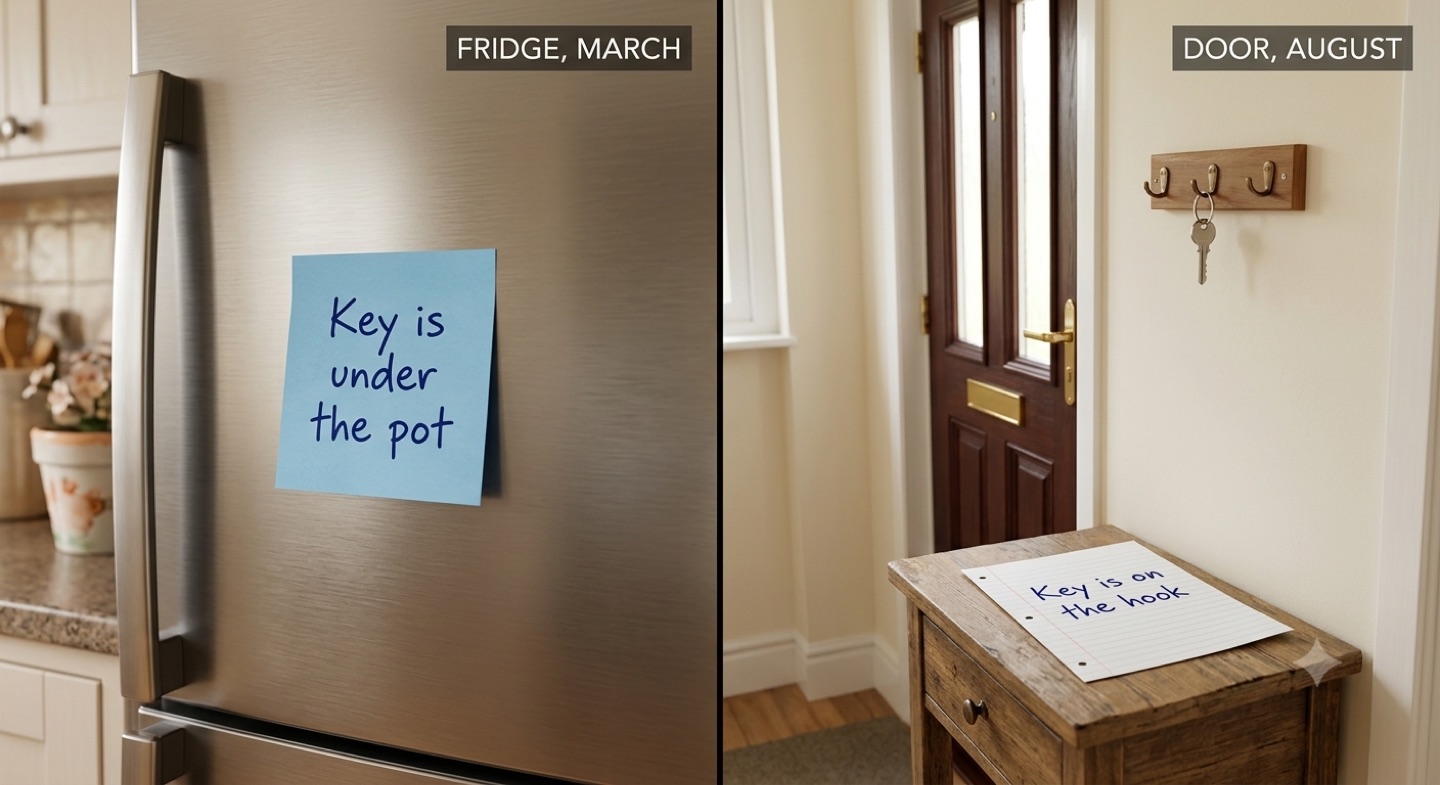
And she will not stop and ask. She does not know one note is old and one is new. Both look equally real to her. So she picks one and gets on with it, cheerfully, as though it were obvious.
Here is what makes it worse rather than better: the more notes you leave, the more chances there are for two of them to disagree. A helper with three notes is safe. A helper with forty notes has a lot of ways to be confidently wrong.
Where the notes actually live
Your AI does not carry your business in its head. At the start of a job, it reads. What it reads sits in several different places: memory files, which are largely summaries the AI wrote about you and re-reads later, and which you can open and edit. Instructions files, the standing rules for a folder or a whole account. Skill files, the packaged instructions for a particular job, like a brand skill. And project instructions and older documents: proposals, handovers, briefs, an old style guide still sitting in a folder.
Any one of those can carry a copy of the same fact. Nothing in the system checks them against each other. Nothing tells you when two of them drift apart.
Nobody can find their own notes, and that is normal
Here is the part that made me feel stupid for months, until I mapped it and realised it was not me. Your standing notes do not sit in one tidy drawer. They sit in layers, and the layers have different reach.
Some notes apply everywhere. Mine include the ones that make my marketing assistant and my article writer work: whatever I am doing, in whatever folder, if I call on them by name they turn up. Other notes apply only in one place, a single project or folder, and are invisible everywhere else. That is not a fault, it is the point. You would not want your video production notes turning up while you are doing your bookkeeping.
But here is the bit nobody tells you, and it is the source of most of the confusion:
When I finally went looking, my own instructions were living in four separate places. Two of them were the good kind of arrangement, a signpost pointing at the real file rather than a copy of it. The other two were genuine duplicates, and one of them was ten days out of date, quietly handing out an old rule to anything that read it. That is what happens once you have built a fair bit, and how the building went is in systems are doing it for themselves.
So if you have ever asked your AI to do something it happily did yesterday, and today it acts like it has never heard of it, you are probably not going mad and it is probably not broken. You are most likely in a different window, or a different folder, from the one holding that note.
Do not take my word for it
I thought this was my own mess until I went looking. It is written into Anthropic's own documentation for Claude, in the section on writing good instructions:
Read that again, because it is doing a lot of work. Not "it will use the newest one". Not "it will ask you". Arbitrarily. And it happens in total silence: there is no warning, no note, no flag telling you two of your files disagreed and it made a call. Somebody did ask the makers to spell out which file is supposed to win. That request was closed without an answer.
So this is not a quirk of my setup, and it is not something you can outsmart by learning the rules. There are no rules to learn. There is only one thing that reliably works, which is not letting the same fact exist in two places.
Find out if this is happening to you
You do not have to take my word for that either. You can catch it yourself right now, and the way you do it is just to ask. No special wording, no clever phrasing. Open whichever AI you use and say something close to this:
Say this
"List every place you can see where my brand colours are written down. Show me the file or setting each one is in, and the actual colours in each. Do not fix anything yet, I just want to see the list."
Then read the list. If only one place comes back, you are fine and you can stop here. If two or more come back, compare them. The moment you find two that disagree, you have found the thing that has been quietly making your work wrong, and you found it in under five minutes.
Do the same for anything else that matters and rarely changes: your phone number, your business address, your prices, your opening hours, how you spell your own business name.
The fix, in three steps you can do this week
There is a name for the file you are about to pick, and it is worth knowing because you will meet it again: the canonical version. Canonical is a fancy word for a simple idea. It means the one that counts. Everything else is a copy, and a copy is only ever an opinion about what the real one says.
Pick the one file that counts, and say so out loud.
For my business that is one brand file. Its opening line says it plainly: colour and font values live here and nowhere else. Writing that sentence down is most of the work, because until you have decided, every copy has an equal claim to being right.
Make every other place point at it instead of repeating it.
The memory file, the brand skill, the project notes, the handovers: none of them list a colour code any more. They all say "see the brand file". A pointer cannot drift. A copy can.
Put a last-updated date on every standing file, then diarise the read-through.
Not to pick whichever is newest, because that trick has already failed me. The date is only a signal that something has gone quiet. What actually fixes it is booking a morning, once a quarter, to go down each file asking one question of every line: is this still true? A date tells you a file is old. Only you can decide it is wrong.
The best time to do it is when someone new joins, or when you are showing your setup to somebody. A fresh pair of eyes finds the stale line faster than any reminder in your calendar.
You may be wondering what happens when the AI cannot reach your one true file: on your phone, in a browser, on a job that does not have that folder open. I used to keep a spare copy for exactly that, and I have just thrown it out. It sat ten days out of date and quietly handed out an old rule the whole time, and it never once saved a job. A stale copy fails silently and looks right. A missing copy fails loudly and gets fixed. So now the instruction is simply: if you cannot reach the real file, say so and stop. Do not guess.
One more lesson worth carrying across. My old brand note said teal should be used "sparingly". That is a feeling, not a rule, and the AI drifted anyway, because every single use looked reasonable on its own. I rewrote it as something checkable: teal is for things you click, and if an element does nothing when clicked, it is not teal.
The words that do the work
People assume there is a magic phrase for this. There is not. You just tell it what you want, the way you would tell a new staff member. Once you have decided which file or setting is the real one, say something like this:
Say this
"From now on, treat [name the file or setting] as the only correct source for my brand colours. Anywhere else that lists them, take the values out and put a note pointing at that source instead. Then tell me which ones you changed."
And if you work mostly in a chat window rather than with files: "Open my saved memory settings and read them back to me. Anything that is out of date, tell me, and I will delete it."
That last one matters more than it sounds. In most chat tools the saved memory is a list you can open, read and edit yourself. Almost nobody ever looks at it. It is worth ten minutes of your life.
It is not just Claude
I use Claude, so my examples are Claude, and why it is Claude rather than one of the others is a separate story. The trap is not particular to it. Every one of the big tools gives you more than one place to write a standing fact, which means every one of them lets you write it twice. Claude has instructions files, skills, project instructions and automatic memory. ChatGPT has custom instructions, project instructions and saved memory. Gemini has custom instructions, saved info and Gems.
The names differ and the details differ. The habit that protects you is the same in all three: decide where a fact really lives, and do not let it live anywhere else.
What to say when someone asks
If someone asks you why their AI keeps getting their brand wrong, here is the whole thing in one breath:
Say this
"It is not forgetting. It never remembered in the first place, it re-reads your notes every time. The problem is that your colours are written down in five places, those five copies no longer agree, and it keeps finding an old one. It cannot tell which is right, so it picks one and sounds certain. Pick one file to be the real one, make everything else point at it instead of repeating it, and the problem goes away."
If this was useful, the companion piece is how to run AI safely on your computer, which covers the other half: what to do about the handful of things that cannot be undone at all.